Applications for people with cognitive disabilities, autism, and aphasia
Pictalk improves the communication and autonomy of people with intellectual disabilities, autism, aphasia, or cognitive disorders.


The challenges of cognitive disabilities in daily life
The experience lived with our little brother Pablo, who has Down syndrome, allowed us to understand the difficulties faced by people with cognitive impairments:
- Communication difficulties: Inability to express verbally, frustration, social isolation
- Lack of time cues: Anxiety related to unpredictability, misunderstanding of schedules
- Unsuitable or impractical tools: Generalist applications that are too complex or unsuitable for specific needs
We now want to help as many people as possible, so that they no longer have to face the same difficulties we did.
Pictalk: Two applications for communication and autonomy
Pictalk is a non-profit organization, developing applications to meet the specific needs of people with cognitive disabilities.
Two complementary applications
Pictalk AAC - Communication Alternative and Augmentative

For non-verbal, aphasic individuals or those with difficulties in oral expression. Communicate using over 40,000 pictograms, construct sentences, and use speech synthesis to be understood.
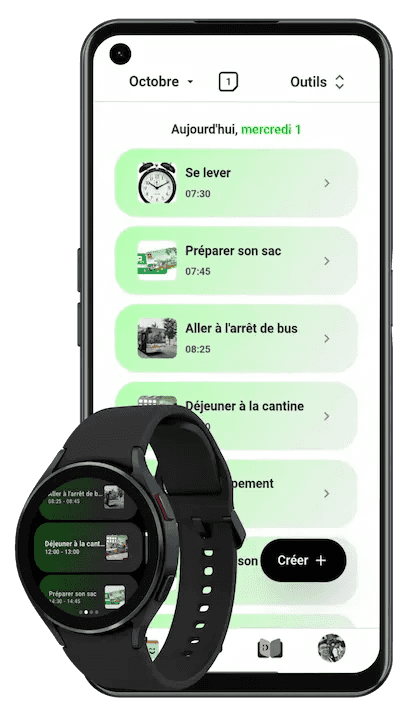
Pictalk Buddy - Agenda, Sequences, and Life Book

To structure daily routines with a visual schedule, guided sequences for routines (getting dressed, brushing teeth), and a life book to share important moments with loved ones or caregivers.
Usable together or separately according to individual needs. Compatible with smartphones, smartwatches, tablets, and computers. Works offline.
"My 9-year-old son with severe autism was non-verbal. Thanks to Pictalk AAC, he can finally tell us when he's hungry, if he's in pain, what he wants to do. And with Pictalk Buddy, he knows what will happen during his day. Less anxiety, fewer crises. These applications have transformed our daily life."
How to get started with Pictalk?
Step 1: Choose your app and download it
Do you need to communicate? Download Pictalk AAC (Android) (Apple) (Computer)
Do you need to structure daily life? Download Pictalk Buddy (Android) (Apple) (Computer)
Both? Install both apps, they work perfectly together.
Step 2: Start simple
For Pictalk AAC:
- Create an initial board with 5-10 pictograms of preferred objects or activities
- Show an example by using the app in front of the person
- Gradually increase the vocabulary over the weeks
For Pictalk Buddy:
- Add 2-3 events of the day (meal, favorite activity, bedtime)
- Create a simple sequence (brushing teeth in 3 steps)
- Review the schedule together each morning
Step 3: Notice the progress!
Allow some adjustment time for the person supported and observe the progress!
Time to get started: 15 minutes
Required level: No technical skills needed
Frequently Asked Questions
Is Pictalk completely free?
Pictalk AAC is completely free, without advertising. To fund this free access, some functionalities of Pictalk Buddy require a subscription.
Does Pictalk work for aphasia following a stroke?
Absolutely. Pictalk AAC is used by many people with aphasia to regain communication abilities. The pictograms allow expressing needs, emotions, and thoughts even without speech. The speech therapist can adapt the vocabulary to the re-education process.
My child has a severe intellectual disability, is Pictalk suitable?
Yes. Pictalk adapts to all levels of cognitive disabilities. You can start with 2-3 very simple pictograms and progress at the person's rhythm. The interface is streamlined, visual, and distraction-free.
Can I use Pictalk in a medico-social setting (IMI, ESAT, FAM)?
Yes. Many organizations already use Pictalk. You can create profiles for each person supported and share content among professionals. Dedicated plans are available to facilitate multi-user management.
Does Pictalk work without an internet connection?
Yes, once the app is installed and the content created, everything works offline. Ideal for use on the go, on vacation, or in places without Wi-Fi.
Can I synchronize between multiple devices?
Yes. Create a free account to synchronize your communication boards and schedule between smartphone, tablet, and computer. Convenient for sharing between home, school, and professionals.
Is technical support available to assist us?
Yes, our team responds to questions via email. We also offer illustrated user guides and tutorial videos. All of this is free.
Can I try Pictalk without creating an account?
Yes, you can download and use Pictalk immediately without creating an account. Creating an account is optional and only necessary for synchronization between devices and content sharing.
Start Free Today
Join 10,000+ families using Pictalk