Pictalk Buddy A pay-what-you-want AAC app for tablets and phones
Pictalk Buddy gives a voice to people who speak little or not at all: pictograms, ready-made vocabularies and a synthetic voice, with no ads. More than 15,000 people use Pictalk.
Pay what you want · iPhone and iPad, Android, Computer
Why is AAC so hard to access?
-
Expensive apps
Many communication apps are expensive, sometimes with a subscription on top.
-
Translated vocabularies
Often designed in English and then translated, they sound unnatural in other languages.
-
Everything to relearn
When words move with every update, you have to start all over again.
For many families, these obstacles put AAC out of reach. We want everyone to be able to communicate.
Everything you need to communicate
The whole app is included for families, with no in-app purchases.
-

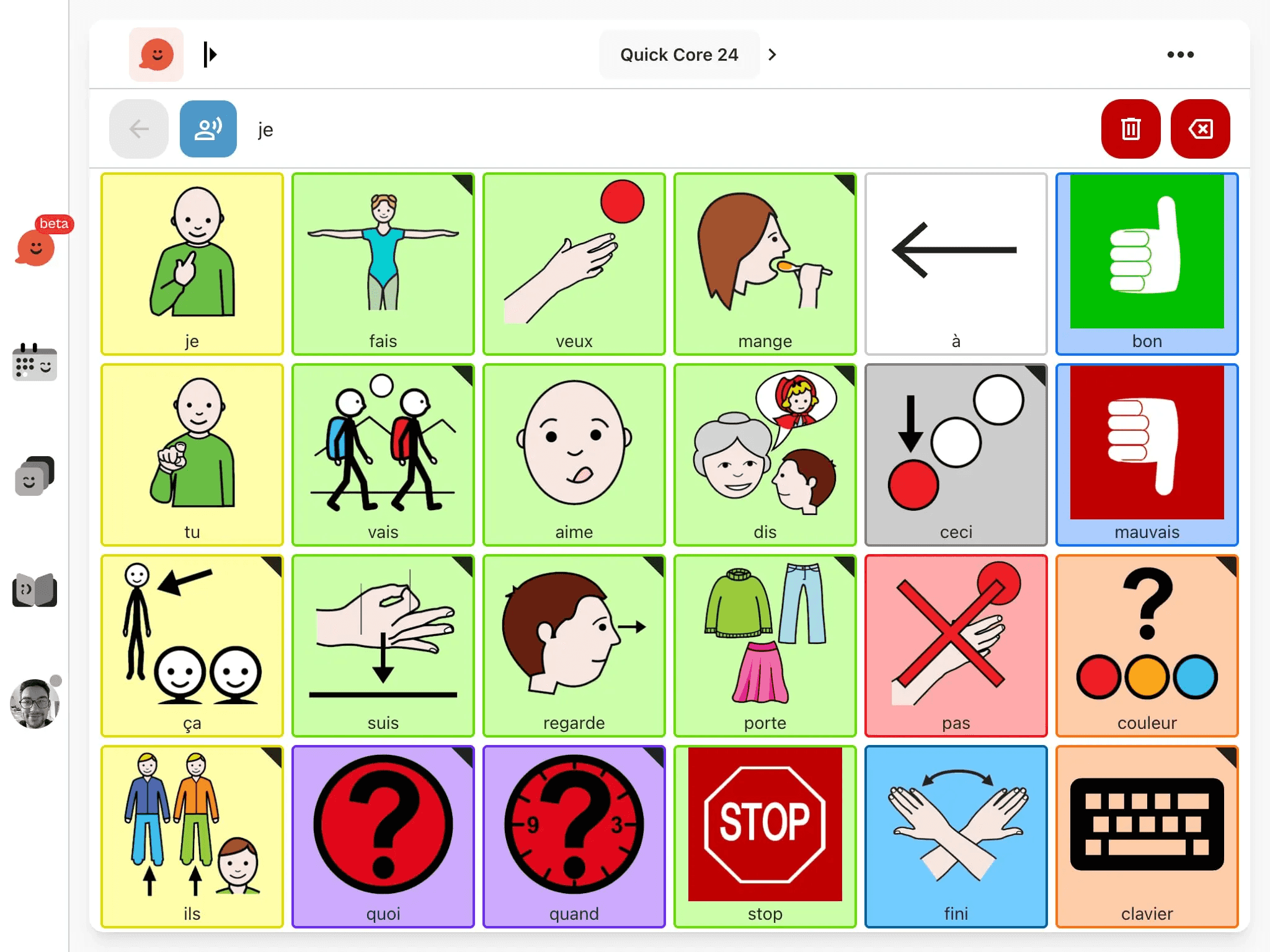
A board that speaks
Touch a pictogram: the sentence builds up, and the tablet reads it aloud, with the voice and accent of your choice.
-

Three vocabularies
Essential 24, Springboard 48 and Horizon 80 grow with the person, without moving the words they’ve learnt.
-

Grammar that keeps up
‘she want ice cream’ becomes ‘she wants ice cream’: verbs are conjugated automatically, and prediction suggests the next word.
-

Schedule and sequences
The same pictograms are also used to organise the day and guide routines.
ARASAAC, Mulberry, Sclera pictograms… and your own photos. The board can also be used with a switch, and everything works offline.
Pictalk: communication for everyone
Pictalk is a non-profit association. Our goal is social impact, not profit.
-
Pay what you want
You choose how much you contribute. The whole app is included for families.
-
No ads
No in-app purchases, no ads, and data hosted in Europe.
-
Driven by solidarity
Grants, donations and professional memberships keep the project going.
If Pictalk is useful to you, you can support us: every contribution counts.
« We had tried several paid applications. Pictalk Buddy offers the same features, if not more. It’s a gift for families. »
How do I start?
- 1
Install Pictalk Buddy
On Android, iPhone, iPad or in a web browser on your computer.
- 2
Choose a vocabulary
Essential 24 to begin with, or a first board of five to ten words.
- 3
Personalise
Add the photos and words that matter: names, places, favourite foods.
- 4
Choose the voice
A voice and accent in your language, from those on your device.
Installation: about 5 minutes
Frequently asked questions
How does pay what you want work? What’s the catch?
There isn’t one: you choose how much you contribute. No hidden purchases, no time limit, no ads. We are a non-profit association.
How is Pictalk funded?
Through public grants, donations and professionals’ Buddy Pro memberships. If Pictalk is useful to you, you can make a one-off or monthly donation: that’s what allows us to keep going. Support us
Which languages are available?
The app is available in 11 languages: French, English, Spanish, Italian, Portuguese, German, Dutch, Norwegian, Swedish, Finnish and Danish. The voices available depend on your device. Test the voices on your device
Can I use Pictalk Buddy on several devices?
Yes. Create an account to find your boards on your tablet, phone and computer.
Are Makaton pictograms available?
Yes, for members of the Makaton association, thanks to our partnership.
Is there technical support?
Yes, our team answers by e-mail. Answering every request takes time: we help the association’s members first. Join Pictalk
Start Today
Available on all your devices · Also works offline
- iPhone and iPad
- Android
- Wear OS
- Computer
4.8 ★ · 113 reviews on Google Play · 10K+ downloads
They support us
Partners, sponsors and awards