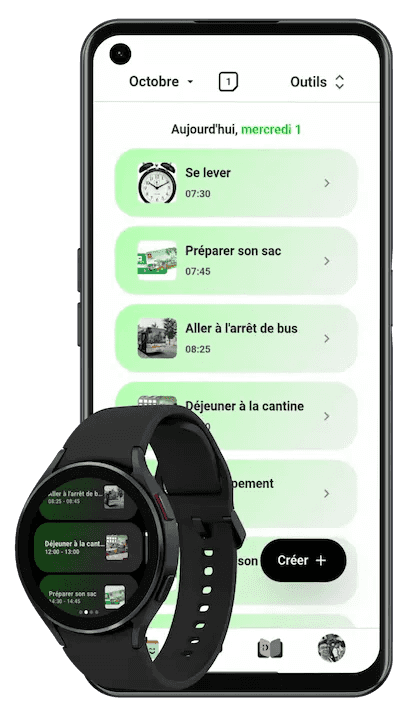
Pictalk Buddy Watch The schedule, the steps and the key words on the wrist
The smartwatch app that supports children, teenagers and adults: neurodevelopmental disorders (ADD, ADHD, autism), cognitive impairments, or simply a need for structure. Pay what you want: everyone contributes what they can.
Why a watch rather than a phone?
-
The phone stays in the bag, or at home.
Forgotten, lost, or not allowed at school, in specialist settings or at work. The watch stays on the wrist.
-
‘What are we doing next?’
The unexpected causes anxiety. The watch shows what is happening now and what comes next.
-
No longer relying on an adult at every step.
The person follows their routine on their own; the carer no longer has to repeat things.
-
Saying what matters when words fail.
It hurts, I’m lost, I’m thirsty: one tap is enough.
-
No more forgotten medicine or appointments.
A full-screen alarm, with a picture, at the right time.
Discreet and not stigmatising, a watch can be worn everywhere: at school, at work, on public transport, on outings.

A watch for everyone, at any age
Pictalk Buddy Watch turns a Wear OS smartwatch into a tool for independence and communication. You prepare the schedule in Pictalk Buddy, on a phone, tablet or computer, and the watch follows it.
-
Children
Morning and evening routines, school, homework. The child sees what to do and ticks off each step themselves.
-
Teenagers and adults
Work, supported employment, travel, independent living. The schedule and reminders are on the wrist, without taking out the phone.
-
Professionals and settings
Specialist schools, supported employment, residential homes, support services, schools. One schedule per person, and the carer sees which activities were done or refused.
Did you use WatchHelp or PictoTask? These apps, which supported more than 10,000 people, have closed. Pictalk Buddy Watch was designed to take over: a picture schedule on the wrist that the person follows and ticks off on their own.
What the watch does
-

The day’s schedule
The current activity, with a picture and a circle that shows time passing, and the next 7 days just a swipe away. For people who are easily distracted or anxious, ‘Current event only’ mode (in the watch settings) shows only what to do right now.
-

Full-screen alarms
Taking medicine, leaving for work, washing… The alarm fills the screen, with a picture, a sound and a vibration.
-

Sequences, step by step
Brushing teeth, getting dressed, having a shower… 8 ready-made sequences, plus all of your own, with pictures, videos and sounds. A voice can read out each step.
-
Done or refused: the carer knows
The person shows that an activity is done, or that they refuse to do it. The carer gets a notification on their phone.
-

25 symbols for the essentials
Hello, thank you, I’m hungry, I’m thirsty, it hurts, I’m lost, I can’t talk… The watch says them out loud.
-

Visual timers
5, 20, 60 or 120 minutes, started with one tap from the watch screen.
-
Staying in Pictalk Buddy
The watch can be locked to Pictalk Buddy, with no games and no browsing. A carer can always unlock it.
-
Even without the phone nearby
Once synced, the watch works on its own, offline, even if the phone is switched off or far away.
« My 12-year-old son with autism was constantly having tantrums. Since he started using Pictalk Buddy Watch, he checks his schedule alone, confirms his activities, and manages his transitions better. The crises related to unpredictability have significantly decreased. The watch never leaves his side; it has become his best partner. »
Choosing a watch and getting started
What you need
- a Wear OS 3 watch or newer;
- an Android phone or tablet to set up the watch, then sync it from time to time.
Pictalk Buddy also works on iPhone, but the watch has to be set up from an Android device. Apple Watch is not supported yet.
Choose a watch
Our selection, depending on use:
-

TicWatch Atlas
The cheapest, for teenagers and adults (large case)
- Battery · 2 to 3 days
- Connection · Wi-Fi, Bluetooth
Indicative price in France (Oct. 2026) ~€90View on Amazon affiliate link -

Xiaomi Watch 2
Low price, light, recent Wear OS
- Battery · 1.5 days
- Connection · Wi-Fi, Bluetooth
Indicative price in France (Oct. 2026) ~€110–130View on Amazon affiliate link -

OnePlus Watch 3 (43 mm)
Small wrists, low price
- Battery · 2 to 3 days
- Connection · Wi-Fi, Bluetooth
Indicative price in France (Oct. 2026) ~€140–200View on Amazon affiliate link -

OnePlus Watch 3 (46 mm)
The longest battery life, for people who forget to charge
- Battery · 4 to 5 days
- Connection · Wi-Fi, Bluetooth
Indicative price in France (Oct. 2026) ~€170–195View on Amazon affiliate link -

Samsung Galaxy Watch8 (40 mm)
The best balance: screen, sturdiness, updates
- Battery · 1 day
- Connection · Wi-Fi, Bluetooth
Indicative price in France (Oct. 2026) ~€195–255 (launched at €379)View on Amazon affiliate link -

Samsung Galaxy Watch9 4G (40 mm)
Going out alone: 4G and location (beta), without the phone
- Battery · 1 day
- Connection · Wi-Fi, Bluetooth, 4G
Indicative price in France (Oct. 2026) ~€280–420View on Amazon affiliate link
- Pictalk Buddy Watch app: pay what you want, with no compulsory subscription. Everyone contributes what they can.
- Small budget: a refurbished Samsung Galaxy Watch6 (40 mm), about €100–170.
- TicWatch Atlas: don’t use its ‘Essential’ mode (power saving), which switches off Wear OS: Pictalk Buddy’s alarms would no longer ring. The brand now only releases maintenance updates.
- 4G option: an extra mobile plan, about €5 a month in France (included in some phone plans). With a Samsung 4G watch, activating the eSIM may require a Samsung phone: check with your mobile network.
Indicative prices from several French retailers, checked in October 2026; they change often.
As an Amazon Associate, Pictalk earns from qualifying purchases. These commissions cost you nothing extra and help fund the association.
Set up the watch in 5 steps
- 1
Install Pictalk Buddy
Download Pictalk Buddy on your phone (Android or iPhone) and create your account. - 2
Set up the watch
Follow your watch’s setup from your Android phone or tablet, with the manufacturer’s app (Galaxy Wearable, Mi Fitness, OnePlus Health…). - 3
Install Pictalk Buddy Watch on the watch
From the watch’s Google Play Store. - 4
Link the watch to your account
Open Pictalk Buddy Watch: a 4-character code appears. In Pictalk Buddy, open Smartwatch, tap Pair and type in this code. - 5
Prepare the first schedule
Add 2 or 3 simple activities (breakfast, favourite activity, bedtime). The watch updates itself about every hour when it is connected, or straight away if you start a sync.
Frequently asked questions
Do I need an Android phone?
Yes, to set up the watch and then sync it from time to time. Carers can use Pictalk Buddy on iPhone, but an Android device (phone or tablet) is needed for the watch.
Does the watch have to stay connected to the phone?
No. Once synced, it works on its own, offline. It updates itself about every hour when it has internet access (through the Android phone, Wi-Fi or 4G), or on demand.
Smartwatches are not allowed at our school or setting?
When locked to Pictalk Buddy, the watch shows no games and no browsing: only the schedule, the sequences and communication. A carer can unlock it at any time. Feel free to show this page to the school or setting.
How does the carer know that an activity is done?
The person ticks off or refuses the activity on the watch, and the carer gets a notification on their phone. Without a connection, the information arrives at the next sync.
How much does it cost?
The app is pay what you want: everyone chooses how much they contribute, with no compulsory subscription and no ads. These contributions fund its development. The watch is bought separately (see the watches above), and the 4G option needs a mobile plan.
Which watches are compatible?
Watches running Wear OS 3 or newer (Samsung Galaxy Watch, Google Pixel Watch, OnePlus, Xiaomi…). Choose a recent model that still gets updates: our selection is above. Apple Watch is not supported yet.
Can I customise the communication symbols?
Not yet: the 25 symbols are fixed so they stay quick to reach. For full communication, Pictalk Buddy on a phone or tablet offers thousands of symbols.
Does the battery last all day?
Expect one day for the Samsung watches, a day and a half for the Xiaomi, 2 to 3 days for the TicWatch Atlas and the 43 mm OnePlus Watch 3, and 4 to 5 days for the 46 mm OnePlus. The simplest thing: charge the watch every evening.
What if the watch is lost or broken?
Everything is saved in your account. Just install Pictalk Buddy Watch on a new watch and link it with a new code.
Is it suitable for adults? And for ADHD?
Yes. Pictalk Buddy Watch supports children, teenagers and adults: at school, at work, in supported employment or at home. The schedule, timers and reminders also help people with ADHD a lot.
I used WatchHelp or PictoTask: how do I switch?
These apps have closed and their data can’t be imported. Recreate the schedule and sequences in Pictalk Buddy (8 sequences are ready-made), then link the watch.
Start Free Today
Available on all your devices · Also works offline
- iPhone and iPad
- Android
- Wear OS
- Computer
4.8 ★ · 113 reviews on Google Play · 10K+ downloads
They support us
Partners, sponsors and awards