Pictalk Buddy Watch: Battery life and communication on your wrist
Application for smartwatch dedicated to people with autism, ADHD, and cognitive disorders. Available now.


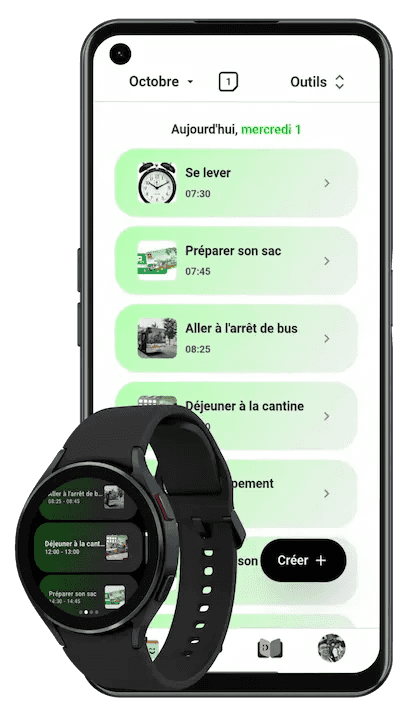
Why a smartwatch for autism and ADHD?
People with autism, ADHD, or cognitive disorders face daily challenges:
- Phones and tablets are often forgotten, lost, or forbidden in many places (school, IME, ESAT, public places)
- Anxiety related to invisibility: not knowing what will happen generates stress and difficult behaviors
- Need for autonomy: constantly relying on a caregiver to know what to do limits fulfillment
- Communication difficulties in emergency situations: unable to express a need or distress without adaptive support
Unlike phones, a watch always stays on the wrist. It is discreet, non-stigmatizing, and accepted everywhere. It is the ideal tool to promote autonomy without relying on bulky devices.
Pictalk Buddy Watch: The watch designed for autism and ADHD

Pablo, 21 years old, and a carrier of Down syndrome with autism spectrum disorder.
Pictalk Buddy Watch transforms your smartwatch into a true tool for autonomy and communication for people with autism, ADHD, or cognitive disabilities.
Why choose a smartwatch?
A smartwatch is always on the wrist, discreet, and accepted everywhere phones are forbidden (school, ESAT, IME). No games or distractions, just the essentials: schedule, sequences, and communication. The person gains autonomy without relying on a phone. Pictalk Buddy Watch syncs with the Pictalk Buddy app once or twice a day, then functions autonomously.
The features of Pictalk Buddy Watch

Visual planning to anticipate the day
The watch displays the current event with a visual progress circle and an image, as well as the upcoming 7 days' events viewable with a simple gesture.

Custom notifications and reminders
Set alarms (wake-ups) or notifications for daily activities such as taking medication, leaving for work, hygiene... An image or pictogram is always displayed.

Guided routines sequences
Easy learning thanks to Sequences. Step-by-step guidance for daily actions like brushing teeth. Create your own Sequences with videos, audios, or images.

Emergency communication: 25 essential pictograms
25 carefully selected pictograms for quick communication.

Built-in visual timers
Easy time management thanks to integrated visual timers in the app.
"My 12-year-old son with autism was constantly having tantrums. Since he started using Pictalk Buddy Watch, he checks his schedule alone, confirms his activities, and manages his transitions better. The crises related to unpredictability have significantly decreased. The watch never leaves his side; it has become his best partner."
How to get started with Pictalk Buddy Watch
Step 1: Choose a compatible watch
Pictalk Buddy Watch works with Android Wear OS watches. We have tested and recommend:
| TicWatch E3 | 50€ to 60€ | Robust entry-level | WiFi only | Buy now |
| OnePlus Watch 3 | ~200€ | Good value with 3 days of battery life | WiFi only | Buy now |
| Samsung Galaxy Watch 7 4G | ~300€ | 4G option, real-time GPS location without phone | WiFi & 4G | Buy now |
Note: 4G connectivity requires an additional mobile subscription (about 5€/month).
Step 2: Install Pictalk Buddy on your phone
If not already done, download Pictalk Buddy for free on Android or iOS and create your account.
Step 3: Pair your watch
Follow the official procedure of your watch to pair it with your phone via the manufacturer’s app (Samsung Galaxy Wearable, TicWatch, etc.).
Step 4: Install Pictalk Buddy Watch
Once the watch is paired, download Pictalk Buddy Watch from the Google Play Store directly on the watch.
Step 5: Connect the watch to your Pictalk account
Open Pictalk Buddy Watch on the watch. A 4-character connection code will appear. On the Pictalk Buddy app on your phone, go to the "Connected Watch" menu and enter this code. The initial synchronization will start automatically (may take a few minutes).
Step 6: Create your first schedule
From Pictalk Buddy on your phone, add 2-3 simple daily events (breakfast, favorite activity, bedtime). The watch will automatically sync the content.
Total setup time: 30 minutes
Required level: No technical skills needed
Frequently Asked Questions
Does the watch need to be connected to the phone constantly?
No. The watch operates autonomously once synchronized. It only needs to be connected 1 to 2 times per day (morning and evening) to update the schedule and sequences. All content is accessible offline.
Which watches are compatible with Pictalk Buddy Watch?
Pictalk Buddy Watch works on Android Wear OS watches. We recommend: TicWatch E3, OnePlus Watch 3, Samsung Galaxy Watch 7. See our complete list of tested models in the article.
Is Pictalk Buddy Watch free?
No. The app is included in the Pictalk Buddy Plus subscriptions (with a watch option at €11.99/month) and Pictalk Buddy Pro.
My child has ADHD, is it suitable for them too?
Absolutely. The features of Pictalk Buddy Watch (visual schedule, timers, reminders) are particularly useful for people with ADHD. They help structure time, manage transitions, and reduce anxiety related to organization.
Can the watch operate without the phone nearby?
Yes. Once the content is synchronized, the watch functions completely autonomously. The person can view their schedule, sequences, and communicate even if the phone is turned off or far away. Only real-time notifications (activity validation sent to the caregiver) require an internet connection (WIFI or 4G).
How does the caregiver receive activity validations?
If the watch is connected to the internet (WIFI or 4G), activity approvals and rejections appear instantly in the Pictalk Buddy app on the caregiver's phone via a notification. Without a connection, information syncs during the next connection.
Can I customize the emergency communication pictograms?
Currently, the 25 emergency communication pictograms are predefined to ensure quick access. For more comprehensive communication, use the main Pictalk AAC app on a phone or tablet with thousands of customizable pictograms.
Is the watch's battery life sufficient for a full day?
Yes. The watches we recommend have a battery life of at least a full day (Samsung, TicWatch E3) and up to 3 days (OnePlus Watch 3) depending on usage. Pictalk Buddy Watch is optimized to consume minimal energy.
Does Pictalk Buddy Watch work for adults?
Absolutely. Pictalk Buddy Watch is suitable for all ages: children, teenagers, and adults with autism, ADHD, or cognitive disorders. Its features (schedule, sequences, autonomy) are relevant to support independence in school, professional settings (ESAT), or at home.
Start Free Today
Join 10,000+ families using Pictalk