Pictalk Buddy Communicate and organise the day, with a cognitive disability or autism
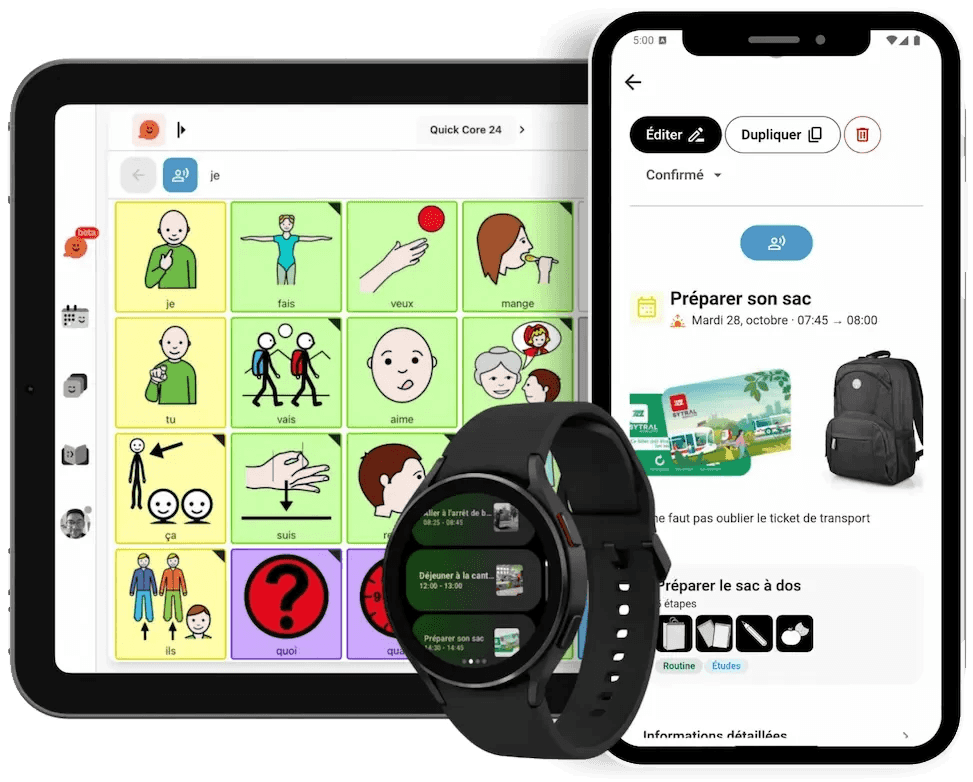
Pictalk Buddy brings together a communication board that speaks, a visual schedule and guided sequences. For people with an intellectual disability, Down syndrome, autism, ADHD or aphasia, and for those who support them.
Pay what you want · iPhone and iPad, Android, Computer
The everyday challenges of cognitive disability
-
Being understood
Without speech, saying you’re hungry, in pain or want to go out becomes a source of frustration.
-
Finding your way in time
Without a schedule you can read, the unexpected is worrying.
-
Tools that don’t fit
Mainstream apps are too cluttered, and paper binders are heavy and quickly out of date.
We lived this with our little brother Pablo, who has Down syndrome. Today, we want to help as many people as possible avoid the same difficulties.
One app, several tools
Use them together or separately, depending on each person’s needs.
-

Communication
A pictogram board that speaks, to express a need, a feeling or an idea. It can be used by touch or with a switch.
-

Visual schedule
The day in pictures, with an alarm that rings at the right time.
-

Sequences
Everyday tasks, one step at a time: getting dressed, brushing teeth, packing a bag.
-

Life books
Photos, text and pictograms to tell family and carers about the day.
Pictalk Buddy works on phones, tablets, computers and Wear OS watches, and offline too.

Who is it for?
Pictalk Buddy is designed by a non-profit association, together with families and health and social care professionals.
-
Children and adults
With an intellectual disability, Down syndrome, autism or ADHD. Start with two or three pictograms, then move on at the person’s own pace.
-
People with aphasia
After a stroke, pictograms and the synthetic voice help people make themselves understood. The speech and language therapist adapts the vocabulary to the rehabilitation.
-
Organisations
Special schools, sheltered workshops, residential care: Buddy Pro lets you follow several people and work as a team.
Are you a professional? Discover Buddy Pro, with a 30-day trial.
« My 9-year-old son with severe autism did not speak. Thanks to Pictalk Buddy, he can finally tell us when he is hungry, if he is in pain, what he wants to do. He knows what will happen during his day. Less anxiety, fewer meltdowns. These applications have transformed our daily life. »
Get started in 4 steps
- 1
Install Pictalk Buddy
On Android, iPhone, iPad or in a web browser on your computer.
- 2
Start small
A first board of five to ten pictograms: favourite objects and activities.
- 3
Lead by example
Use the board yourself while talking to the person, then give them time to answer.
- 4
Add cues
Two or three events in the schedule and a first sequence, like brushing teeth.
Setup time: about 15 minutes
Frequently asked questions
How much does Pictalk Buddy cost?
Pictalk Buddy is pay what you want for families: you choose how much you contribute, and the whole app is included, with no ads and no subscription. Professionals and organisations join the association with Buddy Pro. See our pricing
Is Pictalk Buddy suitable after a stroke?
Yes, for people with aphasia: pictograms and the synthetic voice help them express their needs, feelings and thoughts. Your speech and language therapist can adapt the vocabulary to the rehabilitation.
My child has a severe intellectual disability. Is it suitable?
Yes. Start with two or three very simple pictograms and move on at the person’s pace. The display stays simple and free of distractions.
The person finds it hard to touch the screen accurately. What can we do?
The communication board can also be used with a switch.
Can Pictalk Buddy be used in special schools, sheltered workshops or residential care?
Yes. With Buddy Pro, you follow several people in groups and work as a team with your colleagues and the families. Discover Buddy Pro
Does Pictalk Buddy work without an internet connection?
Yes, once the content has been created. Handy when travelling, on holiday or in places without Wi-Fi.
Can several devices be synced?
Yes. Create an account to find your boards and schedule on your phone, tablet and computer.
Is there help to get started?
Yes: video tutorials and illustrated guides, and our team answers by e-mail. Buddy Pro members get onboarding with the team and priority support. See the tutorials
Start Today
Available on all your devices · Also works offline
- iPhone and iPad
- Android
- Wear OS
- Computer
4.8 ★ · 113 reviews on Google Play · 10K+ downloads
They support us
Partners, sponsors and awards