Free AAC vocabularies, fully adapted to English
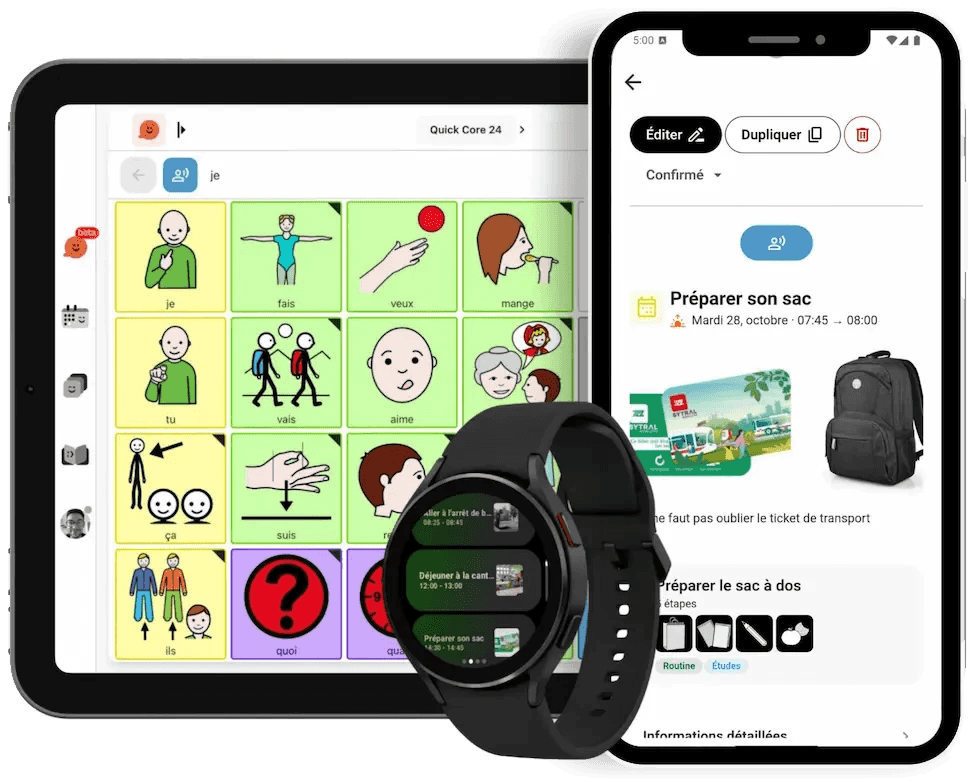
Essential 24, Springboard 48 and Horizon 80: three ready-to-use vocabularies for communicating with symbols, which grow with the person without ever moving the words they have learnt.
Why a good vocabulary changes everything
- The paper communication book overflows, pages get lost, and in the end you only offer requests: eat, drink, toilet.
- Topic boards don’t let the person build a sentence, comment or ask a question.
- When words move around with every update, everything has to be learnt again.
- Professional vocabularies often have to be paid for.
We lived it with Pablo, our little brother: his paper communication book limited what he could say. The book had become far too big, and Pablo didn’t take it with him very often any more. On top of that, adding new words was hard when we were away from home or travelling: everything had to be printed, laminated and fitted with Velcro.
Vocabularies built to last
Words never move. A frequent word keeps the same cell on every page: the movement becomes automatic (motor planning), and the person can focus on what they want to say.
A safety net on every page. Yes, no, more, all done, help me, stop: always within reach, to accept, refuse or stop at any time.
Much more than requests. Ready-to-use sentence branches to chat, react, ask questions, be understood, and say ‘something’s wrong’ with a pain scale from 0 to 10.
Colours that help you find your way. Each type of word has its own colour (an adapted Fitzgerald key), and a folder’s border takes the colour of what it contains.
Grammar that keeps up. In Pictalk Buddy, ‘she want ice cream’ becomes ‘she wants ice cream’: verbs are conjugated automatically and prediction suggests the next word.
Three vocabularies, one path
Essential 24: to get started, on a phone

- 4 × 6 grid, in portrait (phone) or landscape (tablet), with the same words in the same order
- About 1,350 words across 102 pages
- Guided sentences: ‘I want’ + the chosen word
- Everyday topics: eating, playing, feelings, people, body, school, home…
Springboard 48: for longer sentences

- 8 × 6 grid for tablets
- More verbs, little words and pronouns on the home page to combine words
- Pages for introducing yourself, chatting with friends, in class, at the table, and for privacy
Horizon 80: to communicate with ease

- 10 × 8 grid for tablets, with a keyboard to spell everything else
- Sentence starters always in view: I want, I like, it’s, you want, I’m, I have, I’m going to, I can, let’s, there’s
- Hobbies, school subjects, body, health, personal safety
In all three vocabularies
- ARASAAC symbols chosen word by word, gender-neutral where possible
- The same layout in all 11 languages of Pictalk Buddy: ideal for bilingual families
- Cells to personalise (names, places, favourite food) and hidden words to reveal as progress is made, without moving anything
- Designed for children and teenagers, including health, consent and privacy
- Open OBZ format and open CC BY-NC-SA 4.0 licence: your pages are never locked into one app
And because communication doesn’t stop at the grid, Pictalk Buddy also brings together the visual schedule, guided sequences and notebooks, with the same symbols: every moment of the day becomes a chance to use and learn words.
The vocabularies as printable booklets
Each vocabulary also comes as a PDF booklet: all its pages, with a contents page and tabs, and the words in the same places as in the app. Handy as a backup, or where the tablet can't go.
-
 PicTalk Essential 24 PDF · A4 landscape · 9.2 MB Download the booklet
 -
 PicTalk Tremplin 48 PDF · A4 landscape · 6.2 MB Download the booklet
 -
 PicTalk Horizon 80 PDF · A4 landscape · 5.2 MB Download the booklet
 -
 PicTalk Essential 24 Adults PDF · A4 landscape · 8.2 MB Download the booklet
Having ready-made vocabularies in an app you can edit saves users a huge amount of time.
How do I start?
- Install Pictalk Buddy on Android, iPhone or iPad, or use it in your browser.
- Choose a vocabulary: Essential 24 to get started, Springboard 48 or Horizon 80 if the person already combines words.
- Personalise the cells set aside for it: family names, school, favourite food and games.
- Show the way: point to the words on the person’s device when you talk to them, then give them time to answer.
Frequently asked questions
Which grid size should I choose?
Essential 24 is right for getting started or for a phone. Springboard 48 and Horizon 80 suit people who already combine words and use a tablet. Frequent words are arranged to make moving from one vocabulary to the next easier; ask your speech and language therapist for advice.
Are the vocabularies free?
Yes. They are published under the open CC BY-NC-SA 4.0 licence, and Pictalk Buddy is a pay-what-you-want app from a non-profit association.
Can I print the pages?
Yes, Pictalk Buddy can print the boards and booklets, so you have an identical paper version when the tablet isn’t available (bath, swimming pool, flat battery).
Can I use them in another app?
Yes, the vocabularies use the open OBZ format (Open Board Format), which you can import into other compatible apps.
Do they work with eye gaze or a switch?
With a switch, yes: Pictalk Buddy offers single-switch scanning. Eye gaze is not supported: if the person needs it, talk to your speech and language therapist or occupational therapist.
Start Free Today
Join 15,000+ families using Pictalk