Pictalk Buddy Visual schedule, sequences and life book, all in one app
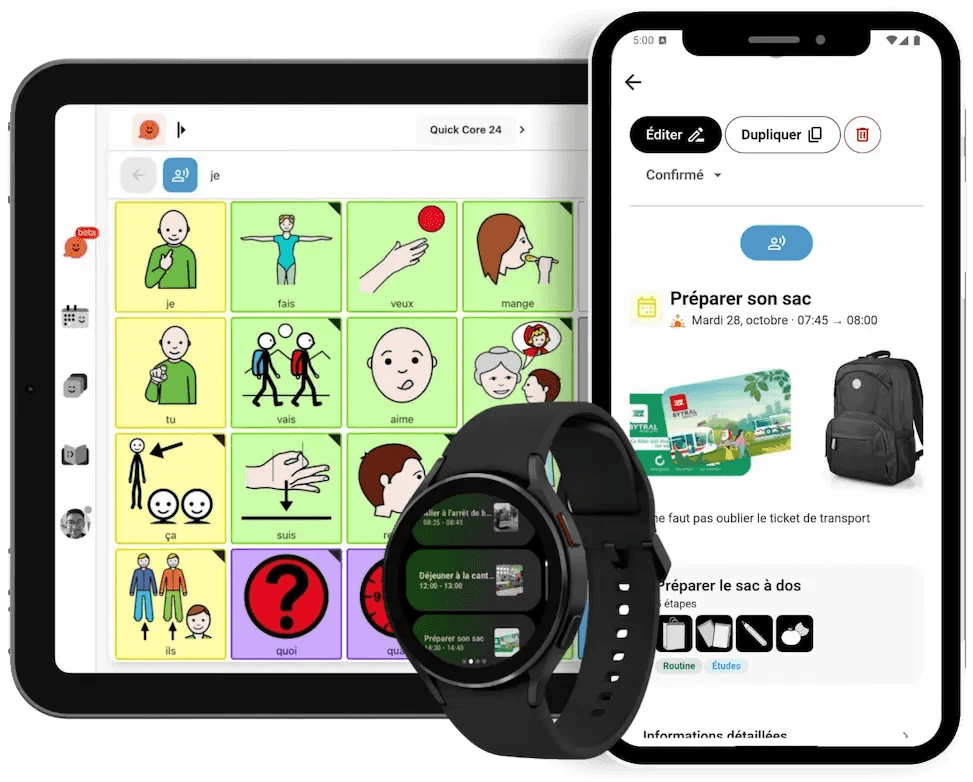
Pictalk Buddy helps autistic children and adults, and those with ADHD or a cognitive disability, understand their day, do everyday tasks on their own and share what they’ve experienced.
Pay what you want · iPhone and iPad, Android, Computer
Everyday challenges
-
Not knowing what’s coming
The unexpected is worrying. Without cues, every change of activity can turn into a meltdown.
-
Time stays abstract
‘Later’, ‘soon’: words that don’t say when.
-
Linking the steps
Getting dressed, packing a bag: planning a task takes a lot of effort.
-
Telling the story of the day
It’s hard to tell loved ones what happened at school or at work.
Pictalk Buddy turns these moments into visual cues that the person can check on their own, at their own pace.
Four tools that work together
The same pictograms and photos from one tool to the next. Use them together or separately.
-

Visual schedule
The day in pictures, with the current moment highlighted and read aloud.
-

Sequences
One step at a time, shown large, with pictures, videos and voice. More than 30 ready-made sequences.
-

Life books
Photos, text and pictogram strips, shared with family, school and professionals.
-

Communication
A pictogram board that speaks, with the voice of your choice. It can also be used with a switch.
On the wrist too: Pictalk Buddy Watch shows the schedule and sequences on a Wear OS watch. Discover the watch

Who is it for?
Pictalk Buddy is designed by a non-profit association, together with families and health and social care professionals.
-
Children and teenagers
Start with two or three pictures, then build up the schedule at the child’s pace.
-
Adults
Schedules at work or in a sheltered workshop, appointments, shopping: more independence every day.
-
Families, school and professionals
Everyone can view and add to the schedule from their own device.
Supporting several people? Buddy Pro adds groups and teamwork with your colleagues and the families.
« My 10-year-old son with autism used to have tantrums every morning because he didn’t know what to expect. Since we’ve been using Pictalk Buddy, he checks his agenda as soon as he wakes up. He sees that after school there’s swimming, his favourite activity. The tantrums have almost disappeared. The sequences help him dress himself. The life book allows the teacher to see what he did over the weekend. It has become essential. »
Get started in 4 steps
- 1
Install Pictalk Buddy
On Android, iPhone, iPad or in a web browser on your computer.
- 2
Set up the day
Two or three events, each with a photo or a pictogram. Look at them together in the morning.
- 3
Add a sequence
A simple routine, like brushing teeth. Help the first time, then let them do it.
- 4
Share the life book
A photo and a few words after a special moment, to read again in the evening or show at school.
Setup time: about 20 minutes
Frequently asked questions
How much does Pictalk Buddy cost?
Pictalk Buddy is pay what you want for families: you choose how much you contribute, and the whole app is included, with no ads. Professionals and organisations join the association with Buddy Pro, after a 30-day trial. See our pricing
My child is 5. Is it suitable?
Yes. Start with a very simple schedule (two or three pictograms) and short sequences (three or four steps). The app grows with the child.
Is Pictalk Buddy suitable for adults?
Yes. Autistic adults, and adults with ADHD or a cognitive disability, use it for their schedule at work or in a sheltered workshop, their routines, their appointments or their shopping.
Can it be used at school?
Yes. The teacher or teaching assistant can view and add to the pupil’s schedule, and the life book links school and home.
Does it work without an internet connection?
Yes, once the content has been created. Syncing between devices needs a connection.
Can I print the schedule and sequences?
Yes, so you can also put up a paper version at home.
How do I share the life book with family?
Create an account and invite your loved ones: grandparents, brothers and sisters, educators. Everyone can view and add to the life book from their own device.
Does Pictalk Buddy work on a watch?
Yes. Pictalk Buddy Watch works on Wear OS watches: the schedule, sequences and timers are right on the wrist.
Start Today
Available on all your devices · Also works offline
- iPhone and iPad
- Android
- Wear OS
- Computer
4.8 ★ · 113 reviews on Google Play · 10K+ downloads
They support us
Partners, sponsors and awards