The tablet: a communication tool for autistic people
Free communication solution on Android tablets and iPad. Pictograms, speech synthesis, visual schedule: everything your autistic child or adult needs.


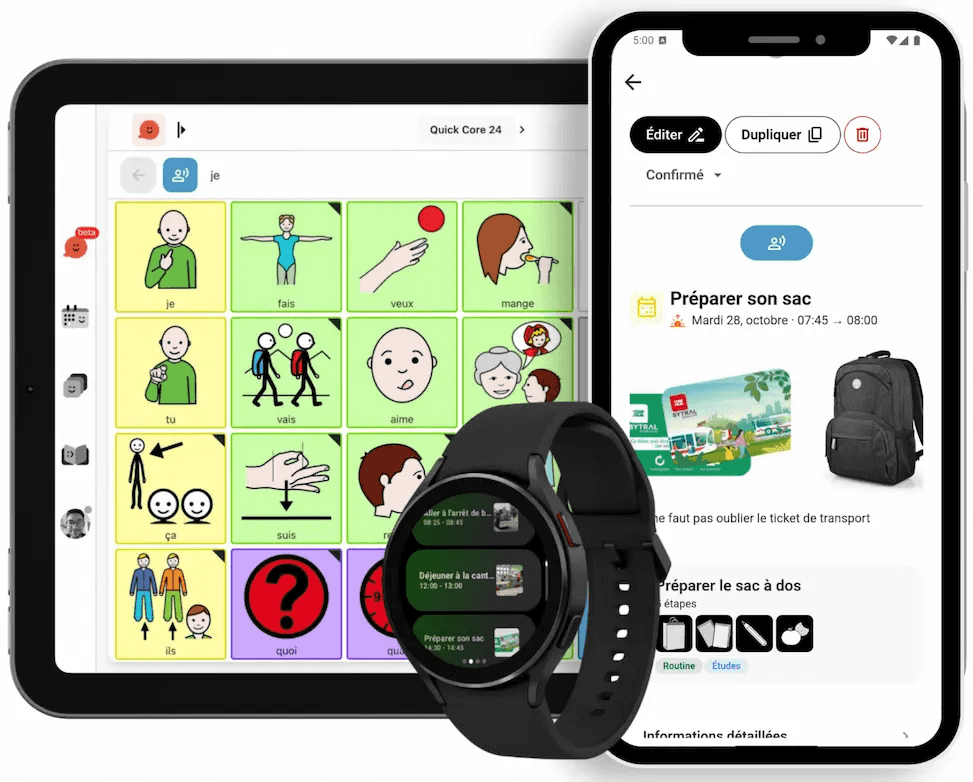
Touchscreen tablets have revolutionized support for autistic individuals. Unlike bulky paper binders or too-small smartphones, the tablet offers the best compromise:
- Large screen: more visible pictograms, easier manipulation for children
- Intuitive interface: direct touch interaction, without keyboard or mouse
- Portable: lightweight and transportable everywhere (home, school, outings)
- Less stigmatizing: socially accepted, used by everyone
- Multi-purpose: communication, learning, independence, leisure
According to Dr. Gepner, psychiatrist and autism specialist researcher:
« A tablet is easier to carry for the child at home or school, and less discriminatory than a PC provided for children with disabilities. »
The problem? Many families do not know how to turn their existing tablet into a true communication and independence tool without spending hundreds of euros on specialized apps.
With Pictalk Buddy, transform your tablet into a free AAC tool
Pictalk Buddy: Communication and independence

- Text-to-speech: the tablet "speaks" on behalf of the person
- Full customization: add your photos, your pictograms
- Communication (AAC): speak and structure your communication
- Visual schedule: structure the day with time markers and images
- Guided sequences: step-by-step guidance for daily tasks (brushing teeth, getting dressed...)
- Life book: share important moments with school and educators
- Custom notifications: adapted visual and sound reminders
- Works offline: communication guaranteed everywhere, even without wifi
- Multi-device synchronization: tablet, smartphone, computer always up to date
Pay what you want • No advertising • No subscription
How to transform your tablet into an AAC tool
Option 1: You already have a tablet
- Check compatibility: Android tablets 8+ or iPad iOS 13+
- Download Pictalk Buddy
- Set up accessibility: activate guided mode (iPad) or screen pinning (Android) to avoid distractions
- Start simple: 5-10 pictograms of the person's preferred objects
- Protect the tablet: invest in a reinforced shockproof case
Option 2: You need to buy a tablet
Our recommendation: Samsung Galaxy Tab A9+ (11 inches)
Samsung Galaxy Tab A9+: best value for money

- Large 11-inch screen: perfect for displaying several pictograms simultaneously
- Native Android: compatible with all AAC applications
- Long battery life: lasts all day
- Affordable price: about €200 (financing possible via PCH if eligible)
- Robust: designed for intensive use
Essential protection: reinforced case
Tablets can fall, especially with children. A shockproof case is essential to protect your investment.
See reinforced case for Galaxy Tab A9+Financing tip
If your child or loved one is a beneficiary of the Disability Compensation Benefit (PCH), you can apply for funding of the tablet and its accessories under "technical aids." See the PCH guide.
« We bought a Samsung tablet for our 7-year-old autistic son. With Pictalk Buddy installed on it, he can finally tell us what he wants, how he feels. And since it's free, we were able to invest in a good tablet with a reinforced case. »
Frequently Asked Questions
Android Tablet or iPad: Which to choose?
Android (recommended for tight budget): more affordable, more model choices, Pictalk AAC works perfectly. Ideal for beginners.
Can the tablet fully replace paper folders?
It depends on the usage and the age of the person. The ideal is to use both. The tablet even offers additional advantages (speech synthesis, instant updates, portability). Some families keep a small backup paper folder for emergencies (dead battery).
How to protect the tablet from drops?
Invest in a reinforced shockproof case with handle. Cases costing 15-30€ can save a 200€ tablet. See our recommendations.
Does Pictalk work on a tablet without Wi-Fi?
Yes, once downloaded, Pictalk works entirely offline. No internet connection needed to communicate. Wi-Fi is only useful for syncing between devices and updates.
My autistic child is attracted to tablet games. How to avoid distractions?
Enable the guided mode (iPad) or the screen pinning (Android). These features lock the user into the Pictalk app. They can no longer exit to open YouTube or games. See the guide here.
Is the tablet fundable through MDPH/PCH?
Yes, the tablet can be included in your PCH file under the section "assistive communication devices". Expect to pay 200-500€ depending on the model. See our full PCH guide.
Start Free Today
Join 10,000+ families using Pictalk