Your child doesn’t speak? Pictalk Buddy helps them communicate
Pictograms and a voice to say what they want, how they feel and what they think. For non-verbal children, autistic children, and children with a neurodevelopmental condition or a cognitive disability.
Pay what you want · iPhone and iPad, Android, Computer
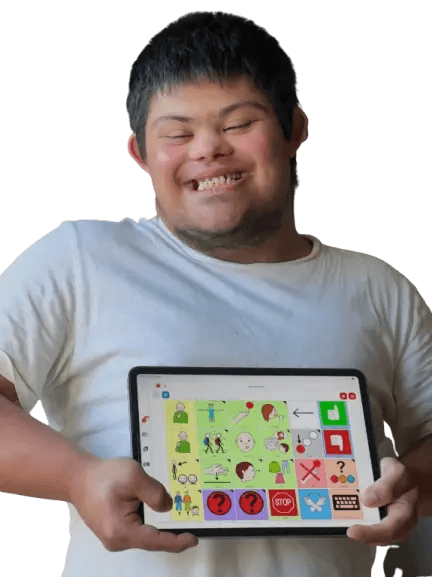
Do you recognise these situations?
-
Meltdowns from frustration
Your child cries or gets angry because they can’t make themselves understood.
-
Guessing their needs
You don’t know if they’re hungry, thirsty or in pain somewhere.
-
At school
The teacher asks you how to communicate with them.
-
The paper binder
Printing, laminating, Velcro, and a binder that’s bursting at the seams.
Has your speech and language therapist mentioned AAC? Pictalk Buddy is a good way to start, and it’s pay what you want.
How Pictalk Buddy helps your child
-

A board that speaks
They touch a pictogram, and the tablet says the word out loud, with the voice and accent of their choice.
-

Ready-made vocabularies
Essential 24 to begin with, then Springboard 48 and Horizon 80: words stay in place as they progress. See the vocabularies
-

A predictable day
The visual schedule shows them what’s going to happen, so there are fewer surprises.
-

Doing it alone
Sequences guide everyday tasks, one step at a time.
Everything can be personalised: add photos of the family, school, their toys and favourite foods. And everything works offline too.
An app made by an association
Pictalk Buddy is developed by a non-profit association, together with families and professionals. More than 15,000 people use Pictalk.
-
Pay what you want
You choose how much you contribute. No ads and no in-app purchases.
-
Alongside speech and language therapy
Pictalk Buddy doesn’t replace therapy: it carries it on at home and at school.
-
An alternative to the paper binder
The same picture exchange principles, on a tablet or phone, always up to date.
« Since we started using Pictalk Buddy, our 6-year-old son with autism can finally tell us how he feels. The meltdowns have decreased. It’s a miracle for our family. »
How do I start?
- 1
Install Pictalk Buddy
On your child’s tablet or phone: Android, iPhone or iPad.
- 2
Start simple
Five to ten pictograms of their favourite objects and activities, or the Essential 24 vocabulary.
- 3
Lead by example
Point to the words on their device when you talk to them: this is called modelling.
- 4
Be patient
Learning takes a few weeks. Add words at their pace.
Frequently asked questions
Will my child stop talking if we use pictograms?
No. Studies on AAC do not show it holding back speech. It reduces frustration and makes children want to communicate. Learn more
From what age can we start?
There is no minimum age. As soon as you notice communication difficulties, you can start, working with your speech and language therapist.
Does Pictalk Buddy replace speech and language therapy?
No, it’s a complementary tool. Use it together with your speech and language therapist or therapist.
My child only needs a few pictograms. Isn’t it too complicated?
No. Start with five to ten pictograms and add more at your child’s pace. The app grows with them.
How much does Pictalk Buddy cost?
Pictalk Buddy is pay what you want: you choose how much you contribute, with no subscription, no ads and no in-app purchases. It is developed by a non-profit association.
Do I need an internet connection?
No, once the content has been created. Your child can communicate anywhere, even without Wi-Fi.
Start Today
Available on all your devices · Also works offline
- iPhone and iPad
- Android
- Wear OS
- Computer
4.8 ★ · 113 reviews on Google Play · 10K+ downloads
They support us
Partners, sponsors and awards